

 Italiano
 Español
Docker is an open-source containerization platform that allows you to build, distribute, and run applications in isolated environments called containers. Since its initial release in 2013, Docker has become a fundamental tool for sysadmins, DevOps engineers, and developers who need consistent, reproducible deployments across any infrastructure – whether local, on-premises, or in the cloud.
In this article, we cover the main features of Docker, how it works, the key concepts you need to understand, and how containers differ from virtual machines.
What is Docker used for?
Docker solves a common infrastructure problem: an application that works in one environment but fails in another due to differences in operating system versions, libraries, or configuration. By packaging the application together with all of its dependencies into a container, Docker ensures it runs the same way everywhere.
In practice, Docker enables you to:
- Standardize environments across development, testing, staging, and production, eliminating “it works on my machine” issues.
- Deploy faster and more reliably, since containers start in seconds and include everything the application needs to run.
- Simplify rollbacks, because each version of your application is an immutable image that can be redeployed at any time.
- Optimize resource usage, since containers share the host OS kernel and consume far less overhead than virtual machines.
Docker structure: how does Docker work?
The Docker structure is based on a client-server architecture. The main components are:
- Docker Engine: the core runtime that builds and runs containers. It includes the Docker daemon (dockerd), which manages images, containers, networks, and volumes on the host.
- Docker CLI: the command-line interface (docker) used to interact with the daemon. Commands like docker build, docker run, and docker pull are issued through the CLI.
- Docker Images: read-only templates that contain the application code, runtime, libraries, and dependencies. Images are built from a Dockerfile, a text file with step-by-step instructions.
- Docker Containers – running instances of an image. Each container is isolated from the others and from the host, but shares the host operating system’s kernel. This is what makes containers lightweight and fast compared to virtual machines.
- Docker Registries: services that store and distribute images. The most widely used is Docker Hub, but you can also use Amazon ECR, GitHub Container Registry, or Google Artifact Registry. For more details, read our guide on how a Docker repository works.
Here is a minimal example of a Dockerfile:
FROM nginx:alpine

COPY ./site /usr/share/nginx/html

EXPOSE 80
This Dockerfile starts from the official Nginx Alpine image, copies your website files into the container, and exposes port 80. You can build and run it with:
$ docker build -t my-site:1.0 .
$ docker run -d -p 8080:80 my-site:1.0
Your site is now running in a container, accessible at http://localhost:8080.
Managing multi-container applications
Most real-world applications consist of more than one service – a web server, a database, a cache layer. There are two main tools for managing multi-container setups, each designed for a different scale:
- Docker Compose: defines and runs multi-container applications on a single host using a YAML configuration file. Ideal for development, testing, and small production deployments.
- Kubernetes: a full container orchestration platform that manages containers at scale across multiple hosts. The industry standard for production workloads that require high availability, auto-scaling, and rolling updates.
Docker containers vs virtual machines: what is the difference?
This is one of the most common questions for anyone approaching containerization for the first time. Both technologies provide isolation, but they achieve it in fundamentally different ways.
A virtual machine (VM) runs a complete guest operating system on top of a hypervisor, which virtualizes the underlying hardware. Each VM includes its own kernel, system libraries, and binaries. This provides strong isolation but comes at a cost: VMs are heavy (typically gigabytes in size), slow to start (minutes), and consume significant CPU and RAM.
A Docker container shares the host operating system’s kernel and uses OS-level features (namespaces and cgroups) to isolate processes, filesystems, and network interfaces. Containers do not include a full operating system – only the application and its dependencies. This makes them lightweight (often megabytes), fast to start (seconds), and efficient in resource usage.
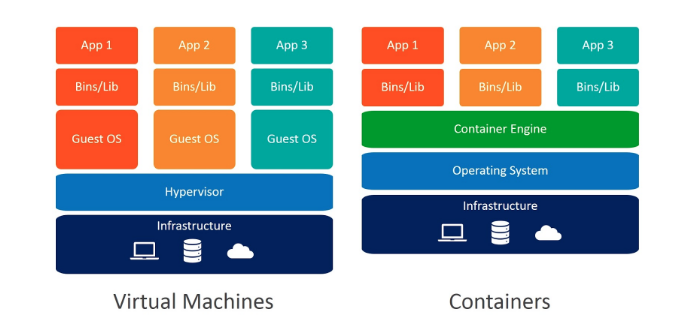
In many production environments, Docker containers run inside virtual machines – the VM provides the hardware-level isolation and the container provides the application-level isolation. The two technologies are complementary, not mutually exclusive.
Getting started with Docker
If you want to go deeper, explore our other articles in this series:
- How to deploy with Docker – build an image, push it to a registry, and run your first container.
- How a Docker repository works – understand the difference between repositories and registries.
- Docker Compose – manage multi-container applications with a single YAML file.
- Docker vs Kubernetes – when to use each tool.
If you manage containerized environments in production, remember that a solid backup strategy is just as important as the deployment itself. Uranium Backup supports backup of virtual machines, databases, and the data that powers your containerized applications.
What is Docker in simple terms?
Docker is a platform that lets you package an application and all of its dependencies into a standardized unit called a container. Containers run the same way on any machine, eliminating environment-related issues between development and production.
Is Docker free?
Docker Engine is open-source and free to use. Docker Desktop is free for personal use and small businesses (fewer than 250 employees and less than $10M in annual revenue); larger organizations require a paid subscription.
What is the difference between a Docker container and a Docker image?
An image is a read-only template that contains the application code, runtime, libraries, and configuration. A container is a running instance of that image. You can run multiple containers from the same image, each isolated from the others.
What is the difference between Docker and a virtual machine?
A virtual machine runs a full guest operating system on a hypervisor and virtualizes the underlying hardware. A Docker container shares the host OS kernel and only includes the application and its dependencies. This makes containers lighter, faster to start, and more efficient in resource usage. The two technologies are often used together in production.
What is a Dockerfile?
A Dockerfile is a text file that contains a set of instructions for building a Docker image. Each instruction defines a layer – for example, which base image to start from, which files to copy, and which ports to expose.
When should I use Docker Compose instead of Kubernetes?
Docker Compose is designed for multi-container applications on a single host – ideal for development, testing, and small deployments. Kubernetes is a full orchestration platform for managing containers at scale across multiple hosts, with features like auto-scaling and rolling updates. For small-scale environments, Compose is simpler; for production workloads requiring high availability, Kubernetes is the standard choice.

Il desktop remoto semplice ed accessibile
Accedi o condividi qualsiasi dispositivo quando vuoi e come vuoi.
Read related articles
How Docker Repository works
Confused about the difference between a Docker repository and a Docker registry? This guide breaks down how each works, how to tag and push images, and how to authenticate securely to Docker Hub and other registries.
How to deploy with Docker
Learn how Docker works, from building images with a Dockerfile to deploying containers, managing multi-container apps, and scaling with orchestration tools.
Kubernetes Cloud: Cloud services for Kubernetes, practical mini guide
An updated comparison of Amazon EKS, Google GKE, and Azure AKS: costs, “No-Ops” modes, and which one fits your MSP environment.